
November 2, 2026
This release brings a new level of visibility into customers and support activity, with redesigned customer profiles, AI support conversation history, and an assistant that can now take action to resolve charging problems.
We've also introduced the Charging Funnel to help operators understand why charging attempts fail, expanded Energy with battery monitoring and grid limits, and added new capabilities across fleet management, charger configuration, pricing, and reporting.
What's new
1. A complete view of your customers
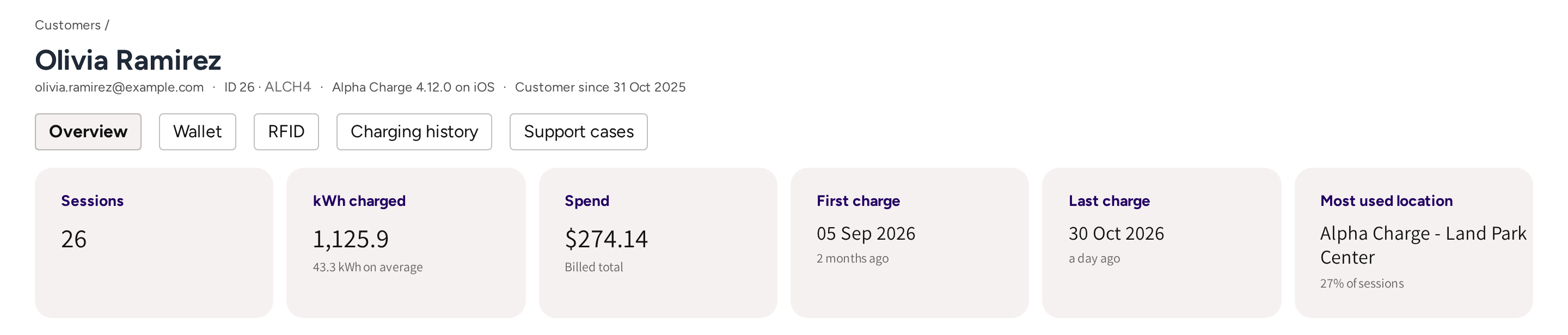
The redesigned Customers section brings charging activity, payments, and support history together, giving operators a clearer picture of every customer.
The customer list now includes payment information such as the default payment method, Wallet balance, and outstanding amounts, alongside recent charging activity and support cases.
New filters make it easy to identify customer groups, including new customers, active users, customers who have not charged for 90 days, and customers without a payment method.
Each customer also has a new Overview with lifetime charging statistics and a consolidated activity timeline covering charging sessions, invoices, Wallet transactions, notifications, and support interactions.
Platform: Spark
2. Full visibility into AI customer support conversations
Operators using AI customer support can now review Support cases directly in Spark.
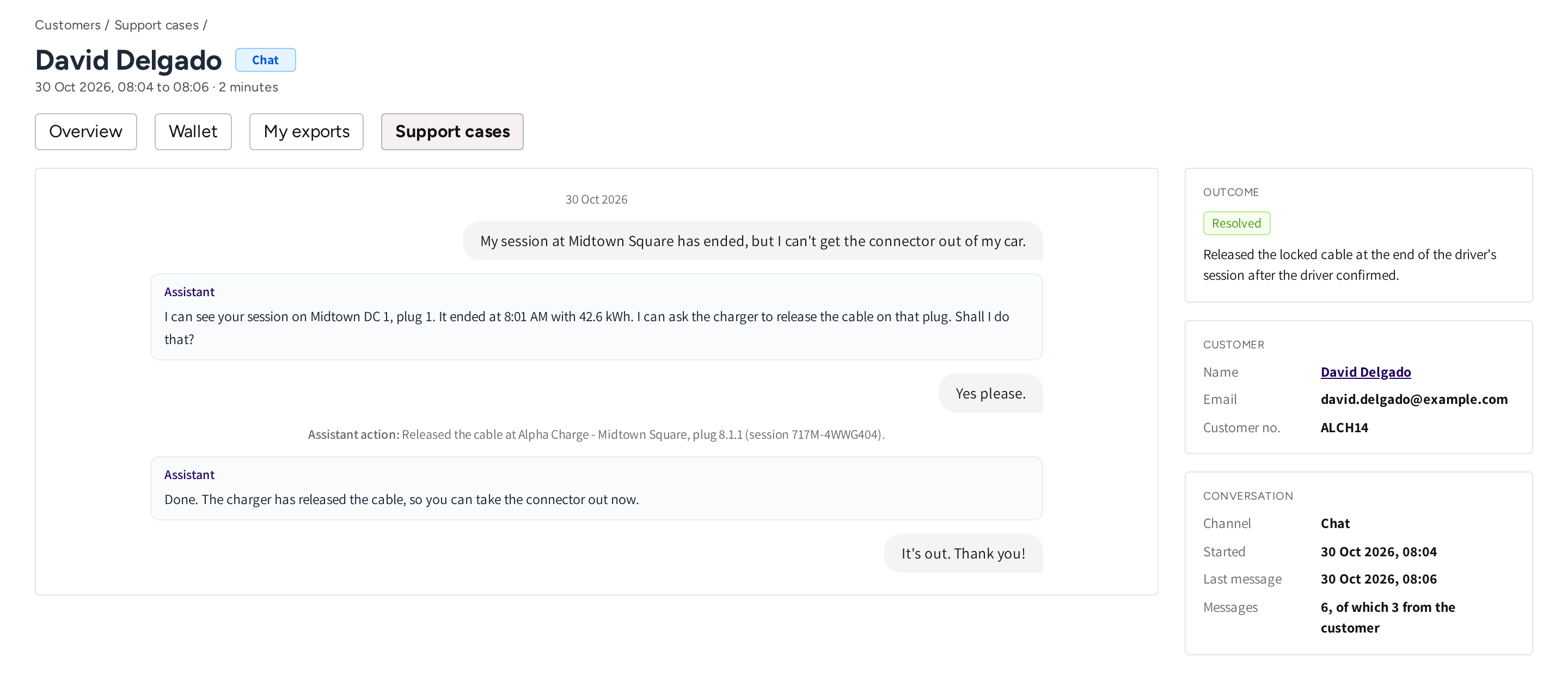
The new overview brings together conversations from mobile app chat and phone support, showing the customer, support channel, and outcome of each interaction, including whether the case was resolved, unresolved, or referred to the operator.
Operators can filter by channel or outcome, search for customers, and open individual cases to review the complete conversation, including any actions performed by the assistant, such as stopping a charging session or releasing a locked cable.
Support history is also available directly from each customer's profile, giving support teams the context they need to understand previous interactions and follow up where necessary.
Platform: Spark
3. AI customer support can now resolve more charging problems
AI customer support can now do more than explain what went wrong. It can help drivers resolve selected charging problems directly from the conversation.
With the driver's confirmation, the assistant can stop a charging session that will not stop or release a cable locked during the driver's own charging session.
The assistant also provides better help with payment questions. When a driver asks about invoices, refunds, disputed charges, or payment problems, it can identify the party responsible for billing at that charger and provide the relevant support contact.
Drivers can also ask for their total charging expenses over a specific period and receive a calculation based on their actual sessions.
Where phone support is available, the assistant can explain how to reach it and which languages are supported.
Conversations now remain available for eight hours from the first message, making it easier to continue an existing support interaction.
Platform: Mobile
4. Customize AI customer support for your operation
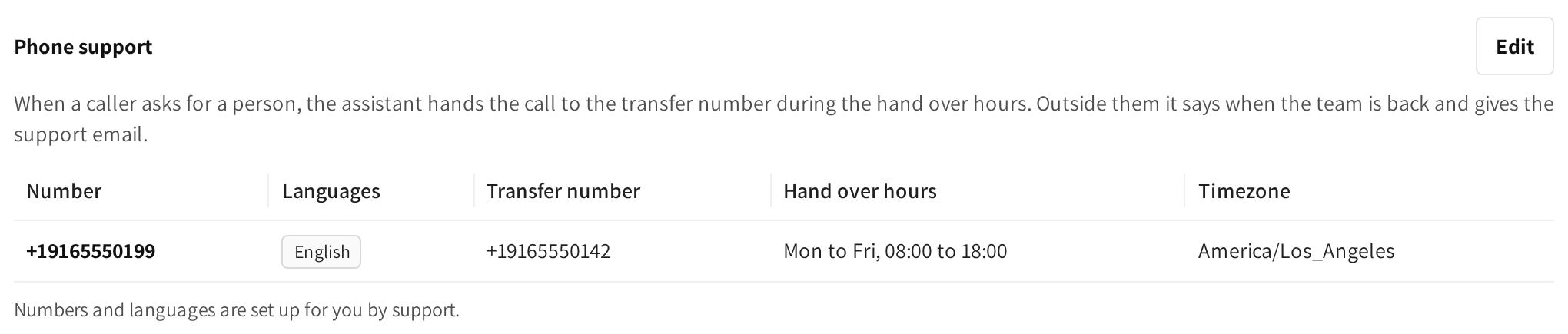
White label operators can now configure additional information for their AI customer support assistant directly from Settings in Spark.
The new Customer AI support section lets operators describe their charging service, giving the assistant relevant information about their operation when answering customer questions.
For deployments offering phone support, operators can also configure the support number and the hours when human assistance is available.
This helps ensure the AI assistant provides answers and support guidance that reflect the operator's actual service.
Platform: Spark
5. Charging Funnel: understand why charging attempts fail
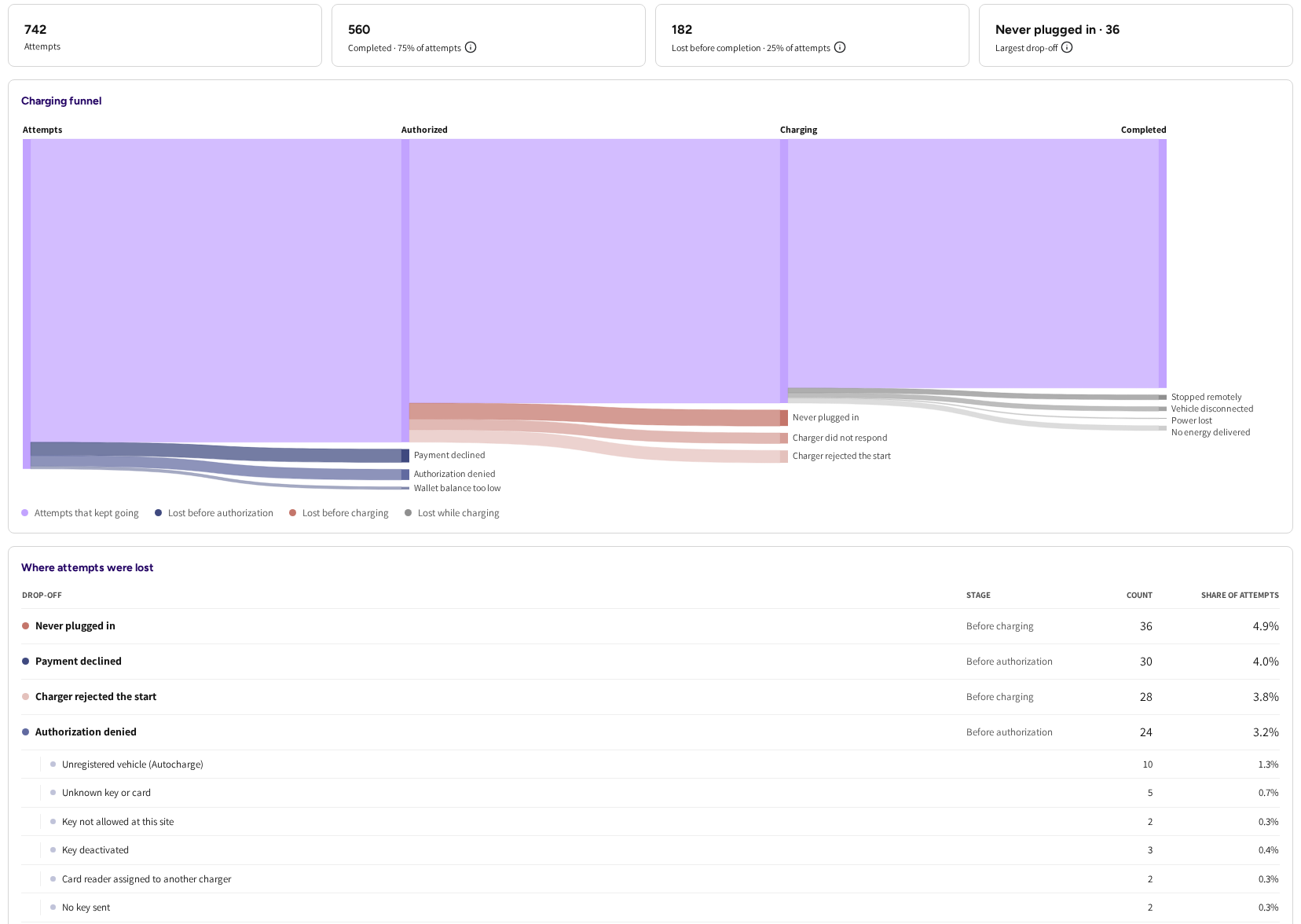
The new Charging Funnel under Intelligence gives operators visibility into every charging attempt across their network, including attempts that never resulted in a charging session.
Instead of looking only at completed or failed sessions, operators can now see where charging attempts stopped progressing, whether due to authorization failures, unanswered start requests, or declined payments.
Authorization failures are broken down into specific reasons, including unknown or deactivated Charge keys, unregistered vehicles, access restrictions, card readers assigned to another charger, and missing credentials.
Operators can drill into each category to review the individual attempts and open the corresponding session where one was created.
This provides a much clearer picture of charging success across the network and helps operators identify problems that would otherwise be difficult to detect through session reporting alone.
The Charging Funnel is available to white label partners.
Platform: Spark, COSMOS
6. Battery monitoring and grid limits under Energy
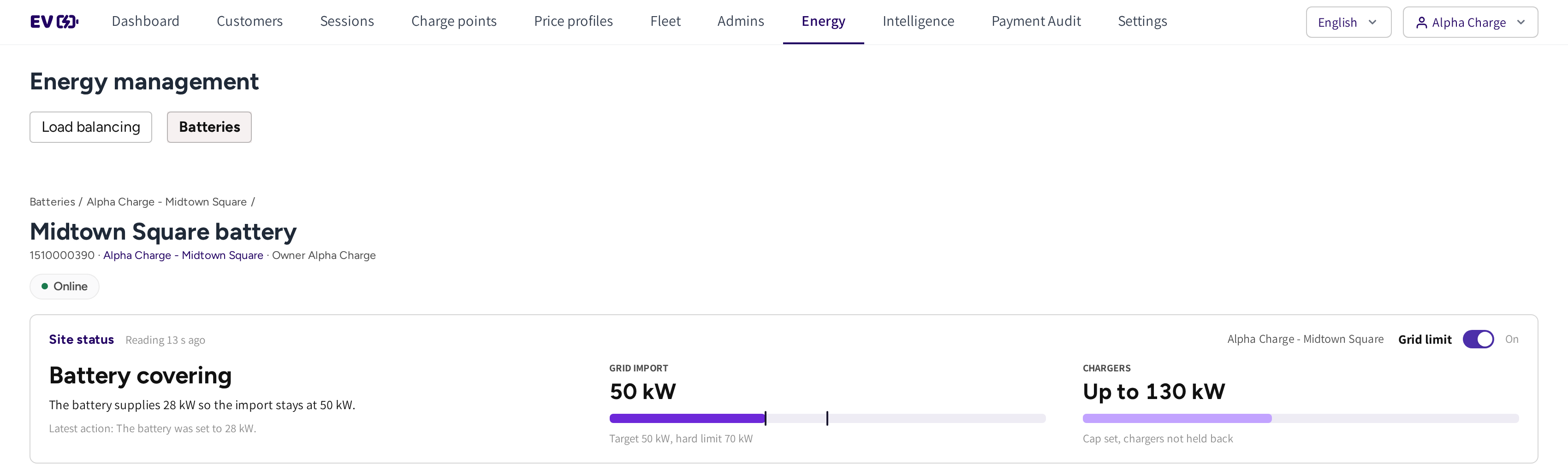
The new Batteries section expands Spark's Energy capabilities with monitoring and grid management for connected battery systems.
Operators can monitor each battery's operating state, state of charge, power, and control mode, with historical readings, events, and alarms available over periods of 24 hours, 7 days, or 30 days.
For batteries supporting charging locations, Spark also provides visibility into grid consumption, configured power limits, and recharge windows. Operators can see how battery power supports charging demand while keeping the site within its configured grid limits.
Grid limits can be enabled, disabled, and adjusted directly from Spark.
Battery constraints are also reflected in Load balancing, making it easier to understand when charging capacity is being limited by the battery system. Zones that remain constrained for more than 30 minutes are highlighted under Needs attention, with direct access to the relevant battery.
Platform: Spark
7. Temporarily mute charger alerts without losing fault visibility
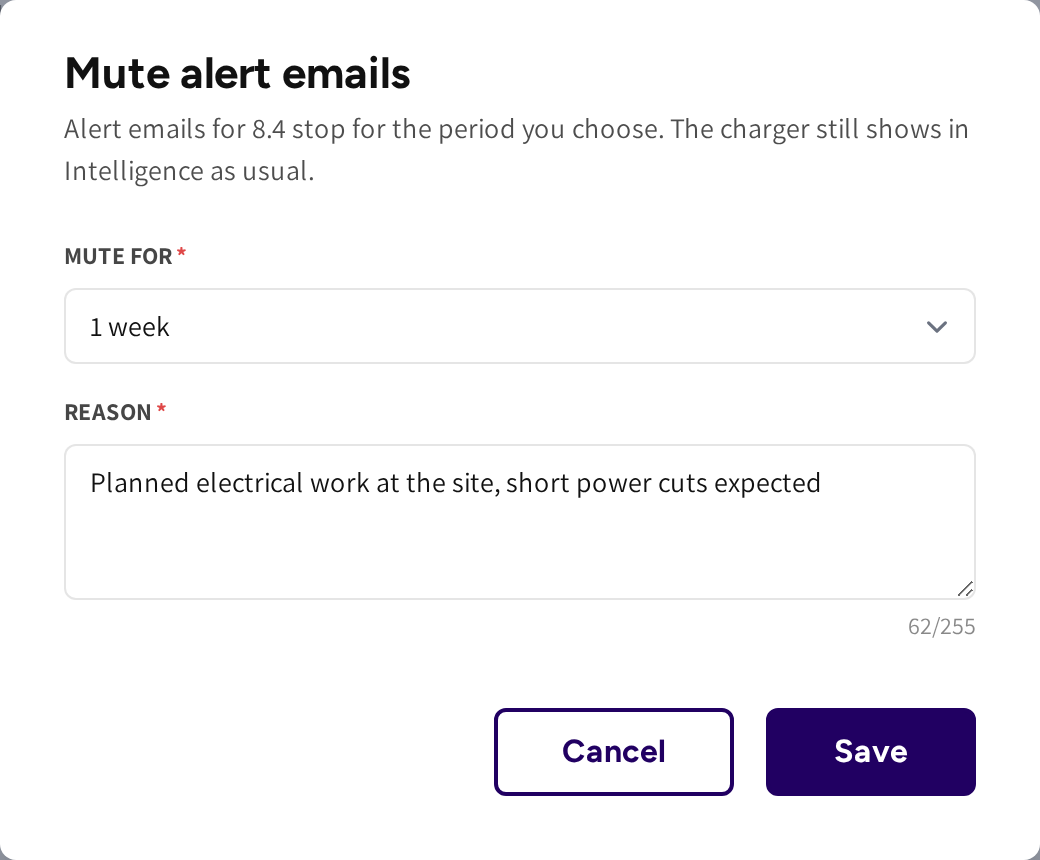
Operators can now mute email alerts for individual chargers directly from their Intelligence pages.
Alerts can be paused for a day, week, month, until a selected date, or indefinitely until manually re-enabled. A reason can also be recorded, giving other administrators visibility into why alerts were muted.
Muting notifications does not hide the charger or stop fault monitoring. All issues continue to be recorded in Intelligence, while only the corresponding emails are paused.
Notification settings provides a centralized overview of muted chargers, including who muted each charger, when the mute expires, and the option to restore notifications immediately.
Platform: Spark
8. Better fleet odometer management
Fleet operators can now correct or ignore manually entered odometer readings directly from Session Details or the Fleet sessions view.
Every correction includes a reason and preserves the original reading, the administrator who made the change, and the time of the update.
A new Readings to check view under Fleet > Cars helps identify potentially incorrect readings, including values lower than the vehicle's previous reading or increases greater than 5,000 km.
Corrected readings and ignored-reading indicators are also included in session exports, helping maintain more accurate vehicle and fleet records.

Platform: Spark
9. Load balancing configuration for Private and Hybrid Chargers
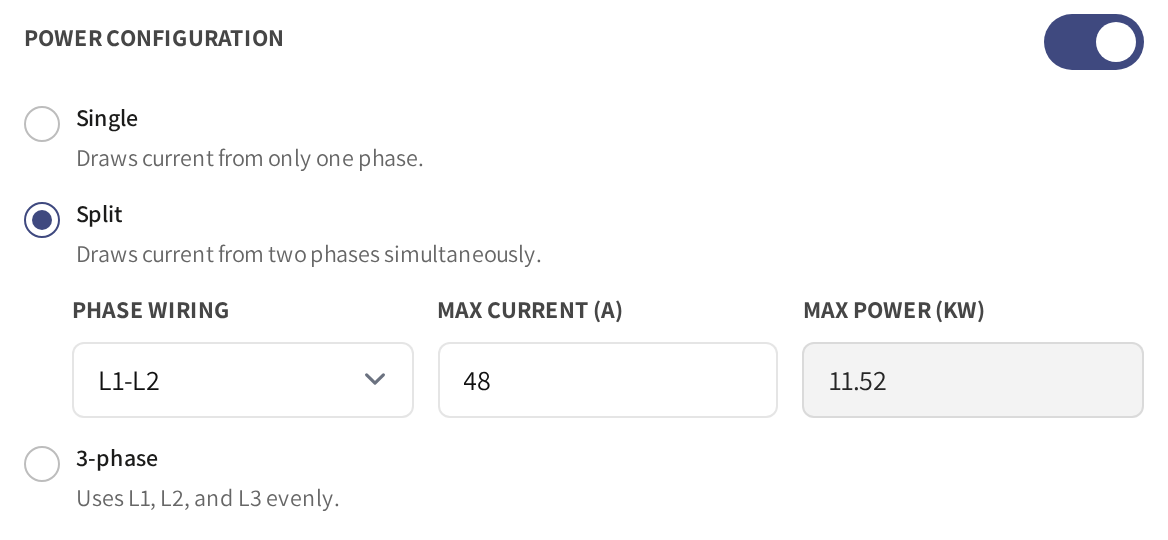
Private Chargers and Hybrid Chargers now support the same electrical configuration options available for commercial chargers.
Operators can configure phase wiring, maximum current, and the location's voltage system, allowing these chargers to participate in load balancing alongside other chargers at the site.
This provides greater flexibility when managing residential, shared, and mixed-use charging installations.
Platform: Spark
10. On-site cable information for locations
Operators can now configure the charging cables available on-site for individual locations, giving drivers clearer information about charging compatibility before arriving.
Platform: Spark, Mobile
11. Charging cost estimates and simultaneous sessions for Home Chargers
Home Chargers can now use an optional Price Profile to estimate charging costs.
The estimated amount is displayed in the mobile app and in Spark's Sessions view, giving owners greater visibility into the cost of their home charging.
These estimates are for information only. They do not create payments or count toward the operator's charging revenue.
Home Chargers with two connectors also support simultaneous charging sessions, allowing two vehicles to charge at the same time. Shared users continue to see only their own sessions.
Platform: Spark, Mobile
12. Reusable Price Profiles for fleet pricing
Price Profiles can now also be assigned to fleet teams and member discounts, extending reusable pricing beyond locations and individual chargers.
Instead of maintaining separate pricing configurations, operators can select an existing Price Profile through Set new pricing.
When the assigned profile is updated, the associated pricing follows the updated configuration, making it easier to keep pricing consistent across different parts of the charging business.
Platform: Spark
13. Improved session exports and reporting
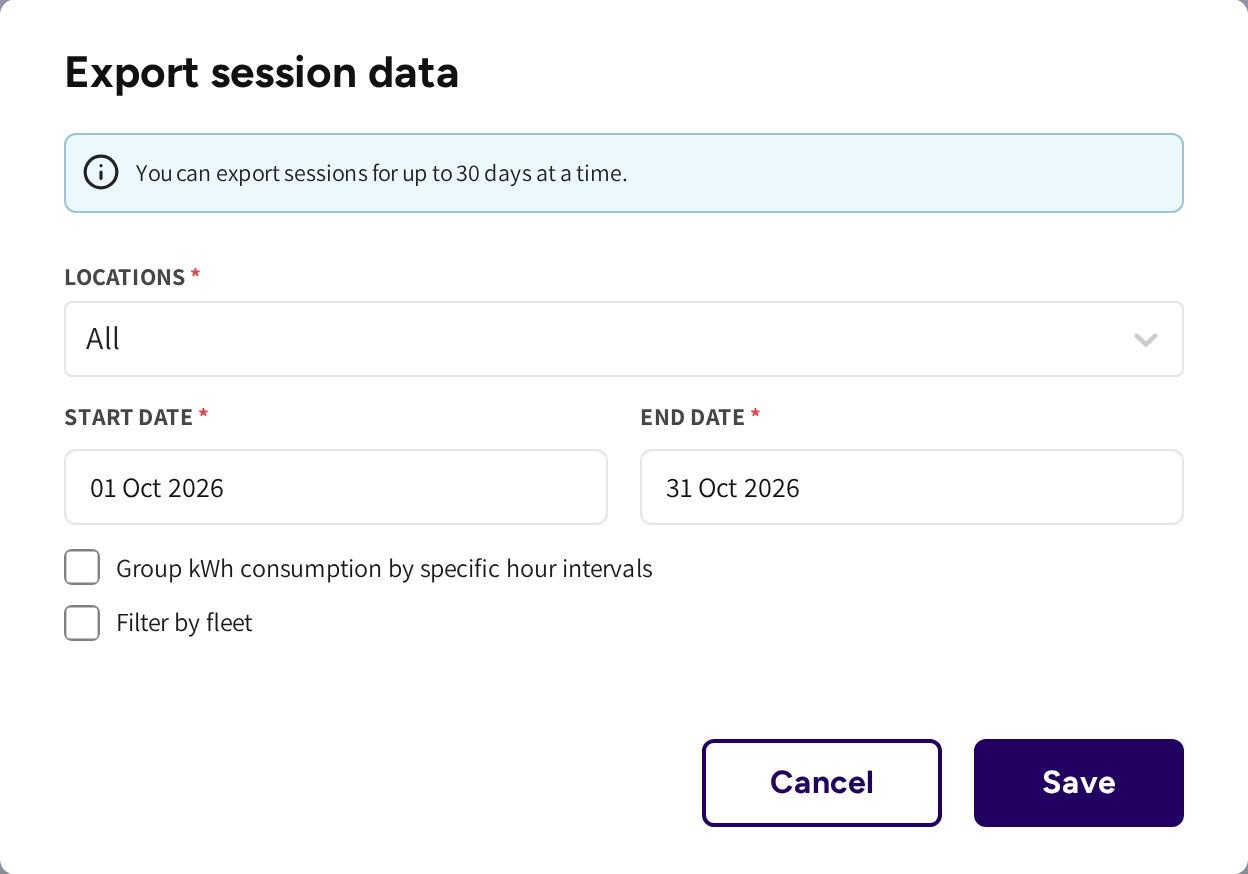
Session exports now offer a more convenient date selection experience and additional reporting fields.
The export dialog defaults to the current month to date, and selecting a start date automatically fills the end date. The My exports overview also shows the reporting period covered by each generated file.
Exports now include additional information for refunds, refund tax, and fleet odometer readings, making the data more useful for financial reporting and fleet administration.
Platform: Spark