
Notification settings
Choose which admins receive fault alert emails, for which locations, and which of the six alert types they get, so the right person hears about a charger going down without everyone else being copied in.
Intelligence watches your network whether anyone is looking at the page or not. Notification settings is where you decide who gets told.
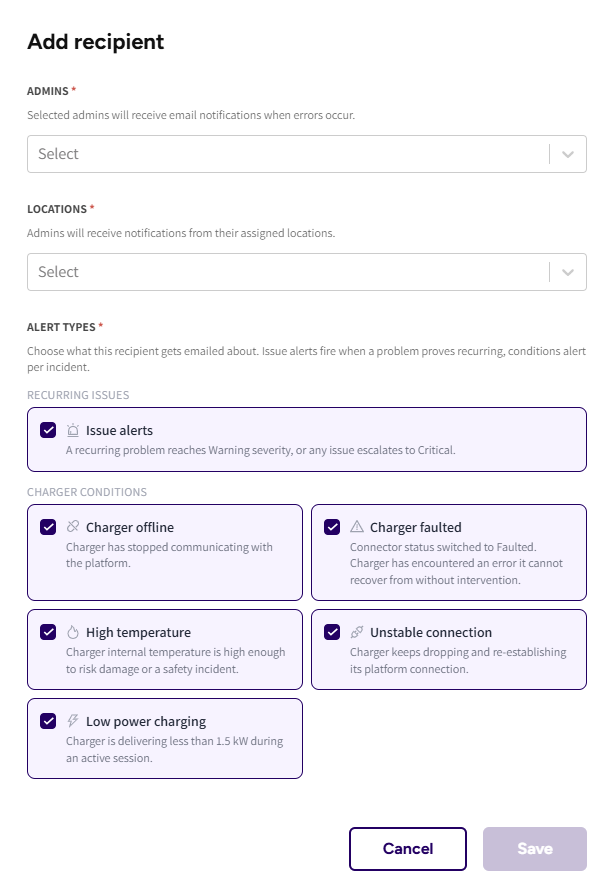
Adding a recipient
Press Add recipient and pick:
- The admin who should receive the emails.
- The locations: all of them, or a specific set. An admin responsible for one site does not need alerts from the rest of the network.
- The alert types they should get.
Each row in the table shows the recipient's name, email, locations and alert types, and can be edited or deleted from the actions menu at the end of the row.
The six alert types
| Alert | Sent when |
|---|---|
| Charger offline | The charger has stopped communicating with the platform |
| Charger faulted | A connector switched to Faulted, meaning an error the charger cannot recover from on its own |
| High temperature | Internal temperature is high enough to risk damage or a safety incident |
| Unstable connection | The charger keeps dropping and re-establishing its connection |
| Low power charging | The charger is delivering less than 1.5 kW during an active session |
| Issue alerts | A recurring problem reaches Warning severity, or any issue escalates to Critical |
The first five mirror conditions the chargers report themselves. Issue alerts is the one driven by the grouped issues, so it fires on a pattern rather than on a single event.
Alerts count repeat episodes, so an email can tell you this is the fourth time the same charger has gone offline. That is usually the more useful signal than the fact it is offline right now.
One email, not twenty
When several chargers trip at the same time, which usually means site power or connectivity rather than the chargers themselves, the platform holds the individual emails and sends one summary instead. The subject says what happened and where:
- "8 chargers went offline at Harbour Park", when they all dropped for the same reason.
- "11 charger alerts across 3 locations", when the conditions or the sites differ.
Inside, the chargers are listed under their locations, so you can see the shape of the incident in one read.
If one of those chargers also escalates to Critical in the same sweep, that escalation is folded into the same email and marked (now Critical) rather than arriving separately. One incident, one message.
Alerts that are not part of a storm still arrive on their own, and their subjects read "New issue: ... on ... at ..." for a problem that has just reached Warning, and "Critical: ... has escalated" for one that has gone Critical.
There is nothing to configure for this. It applies to every recipient and every alert type.
Who you can add
You can add admins on your own account. If you oversee sub operators, their admins are not in your list and yours are not in theirs, because a subscription across accounts would mail one operator's fault data to another.
The location list is the other way round: it covers every location you oversee, so you can point your own admins at any site in your network.
Common questions
How do I get emailed about faults? Intelligence, then Notification settings, then Add recipient. Pick the admin, the locations and the alert types.
We are getting too many emails. Narrow the alert types on that recipient rather than deleting them. Offline and Issue alerts are usually the two worth keeping, and the rest can be switched off per person. A site going down produces one summary email, not one per charger.
Twenty chargers went offline and I only got one email. That is how it should be. Chargers tripping together are one incident, so they are grouped into one message listing them under their locations, with any Critical escalation among them folded in and marked "(now Critical)".
An admin says they are not getting alerts. Check that they are on the list, that their locations cover the site in question, and that the alert type is switched on for them. If all three look right, check Email delivery to see whether the email was sent and what happened to it.
Can I add someone who is not an admin? No. Recipients are admins on your account, so alerts never leave the people who already have access to the data behind them.
Can I subscribe an admin from one of my sub operators? No. Each account manages its own recipients.
Updated 25 days ago