
Remittances
On the remittance model you are paid your share of the charging revenue on a schedule: follow each session's payout, download the monthly statement per location, and check it against your sessions.
On the remittance model the platform collects the drivers' payments and pays your share as a Remittance, on a schedule. My finances shows what each session earned you and holds the statements to download.
At a glance
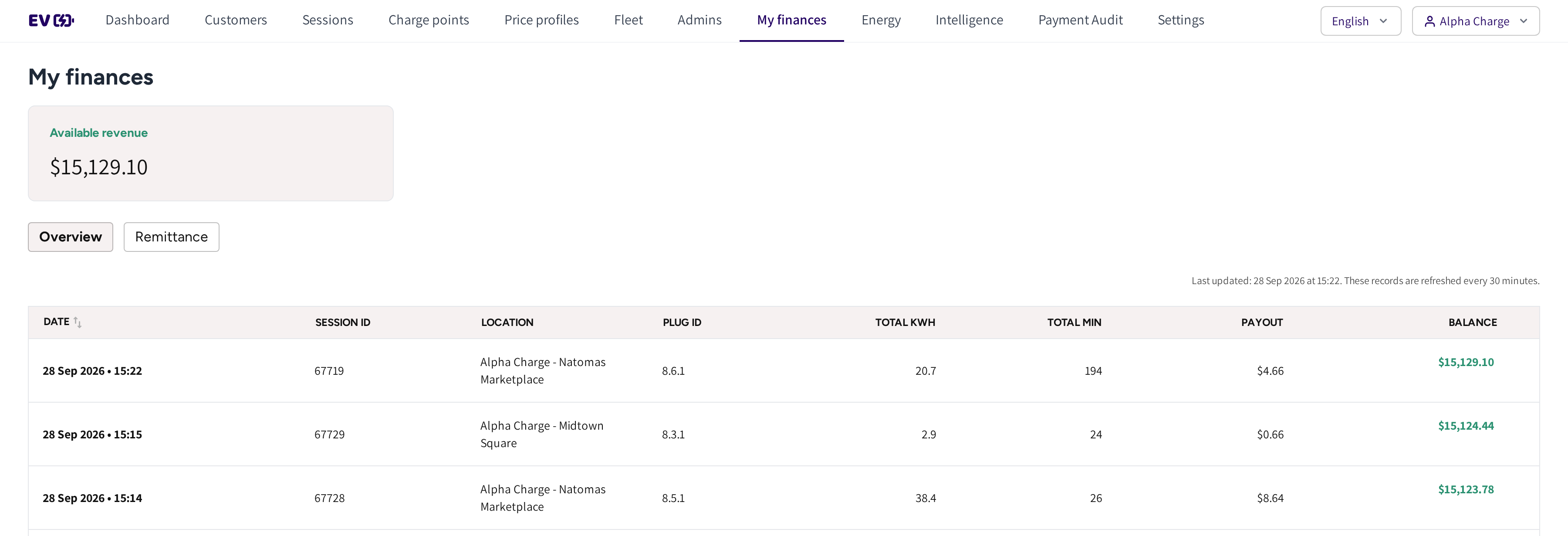
- Available revenue: your payout so far this month.
- Overview and Remittance: the session payouts, and the statements. If a subscription summary exists, then Subscription is shown too.
- Date, Session ID, Location and Plug ID: which session it was and where it ran.
- Total kWh and Total min: the energy and the charging time.
- Payout and Balance: what the session earned you, and the month's total after it.
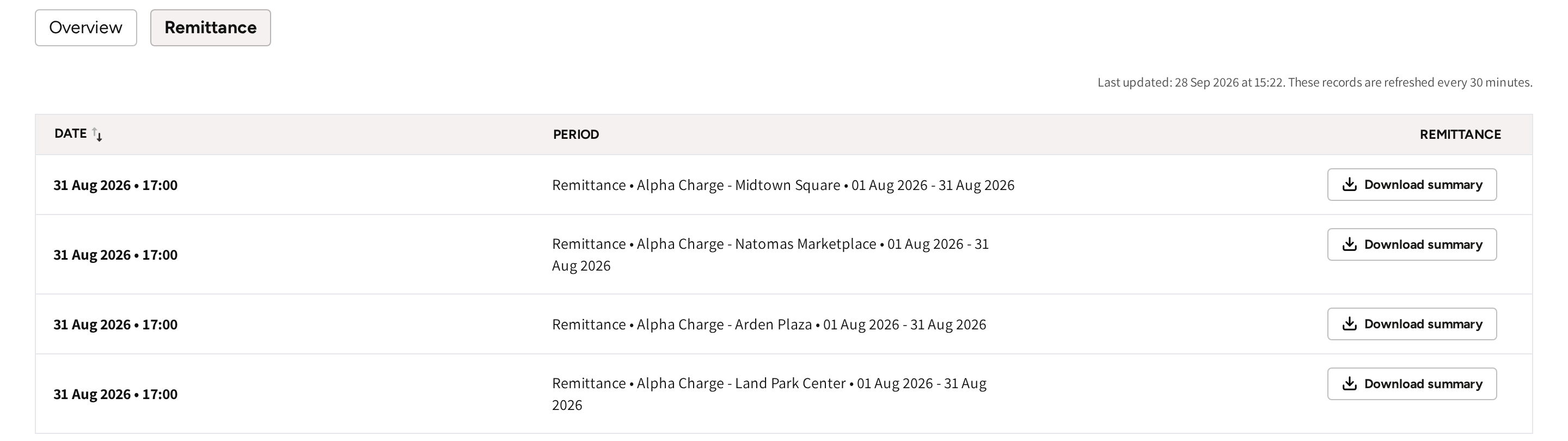
- Remittance: one statement per location and month, with its Period.
- Download summary: the statement as a PDF for your records.
Read the Overview
Every finished session adds a row with its payout, newest first. Balance adds up the month and starts again at the first of the next month.
The monthly statements show in the same list on the day they are made, with Download summary. The refresh line above the list says when it was last updated; it is refreshed every 30 minutes.
Download a statement
- Go to My finances and open Remittance.
- Find the location and the Period.
- Click Download summary.
The statement covers one location for one calendar month. It is made after the month has closed.
Per charger, the statement lists the energy, electricity costs, idle fee and revenue share. Under the totals, each of them has its own tax line. The idle fee has its own line, apart from the electricity costs.
Check a statement against your sessions
- Open Sessions and filter on the statement's month and location.
- Click Export sessions to download the list, at most 30 days at a time.
- Compare the energy of the export with the statement's energy.
Each session's detail page shows what the driver paid, see Session details. The Overview tab here shows the payout side of the same session.
When you refund a session
- If the statement for that session has not been made yet, then the session's payout row is recalculated for the refund.
- If the statement is already made, then the row stays as it is, and the refund is settled outside the statement.
If you know a refund is coming, then make it before the month closes, so it lands on the right statement.
Subscription summaries
If your plan includes a subscription, for example a fee per charger, then Subscription is shown after the first summary. It lists one summary per period with Download summary. A charger added or removed during the period, or a rate that changes, is counted for the days it applied.
Financials for accounts with several operators
If your account manages several operators, then Financials holds their statements. Its Remittance and Subscription tabs cover every operator under you. Filter by CPO and Location, and use Mark as done to track what has been handled.
Common questions
When do I get paid? On the schedule agreed for your account, with one statement per location for each month. The statement is made after the month closes.
Where do I download a statement? On My finances → Remittance, click Download summary on the row of that location and month.
Why does Available revenue start low at the start of a month? It counts this month's payouts only. The previous month is on its statement.
I refunded a driver. Will my payout change? Yes, if the month's statement has not been made yet: the session's payout row is recalculated. Once the statement is made, the row stays as it is.
What is the difference between remittances and withdrawals? With withdrawals you request payouts yourself from Revenue, see My finances. With remittances you are paid on a schedule, with a statement per period.
Updated 23 days ago