
Issues
The Issues tab groups repeated faults on the same charger into one problem with a severity level, an occurrence count and a 14 day trend, resolves them automatically once charging works again, and gives each one a detail page with the connector's history and the AI root cause.
The Issues tab is the grouped view of everything worth acting on. It groups repeated faults on the same charger, and on the same connector where the platform knows which one, into a single issue. One flaky charger reads as one problem with a count, not as thirty scattered rows. Both detection sources feed the same issue: AI analyzed session faults and charger reported diagnostic events.
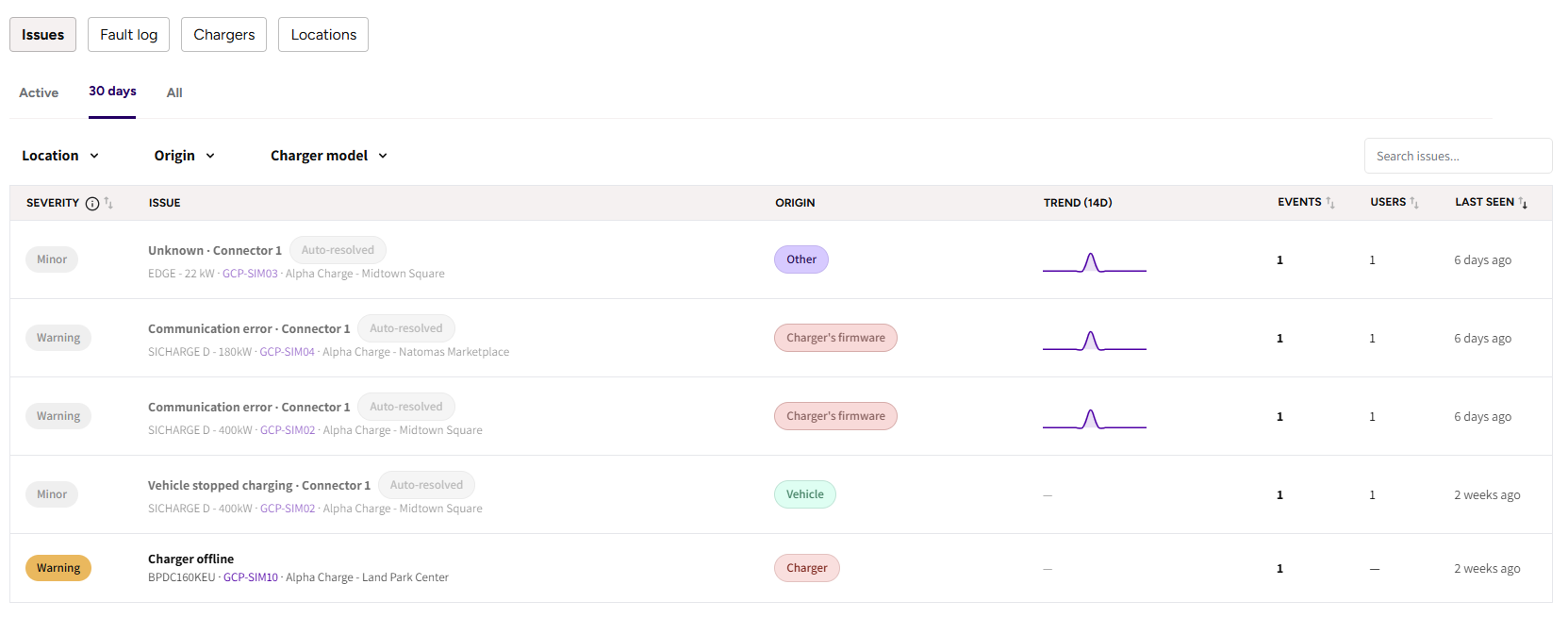
Reading a row
- Severity: Minor, Warning or Critical. Hover the pill to see exactly why an issue has the level it has.
- Issue: what is wrong, on which charger, at which location.
- Origin: where the fault points, such as charger hardware, the vehicle or the driver.
- Trend (14d): a sparkline of occurrences over the last two weeks. A flat line that stopped days ago is a different problem from one still climbing.
- Events and Users: how often it happened, and how many distinct users it hit.
- Last seen.
How severity is decided
Charger hardware and firmware faults start at Warning, everything else starts at Minor. An issue then climbs one step for each of:
- 5 or more users affected
- 3 or more occurrences within 72 hours
- 3 or more faults in a row without a successful charge in between
So a fault that only ever hit one driver once stays Minor, and the same fault hitting five drivers in a morning becomes Critical. The severity pill lists the reasons on hover, so the level is never a black box.
Filtering
The Active, 30 days and All chips control which issues are listed. On top of that you can filter by CPO, location, origin or charger model, or search.
When your network is genuinely healthy, the Active view says so instead of showing an empty table. If a search or a filter emptied the table, it says that instead, because a narrowed result says nothing about the state of your chargers.
Auto-resolve
An active issue resolves itself after 5 successful sessions on the affected connector since the last fault. The pill shows the progress as you go, for example 3/5, and the detail page shows the same progress as Healthy sessions to auto-resolve.
A new fault reactivates the issue and the counter starts again. Resolved issues get an Auto-resolved pill and keep the severity they had when they resolved, so a Critical issue that went away still reads as having been Critical.
Nothing has to be closed by hand. If charging works again, the issue goes away on its own.
The issue detail page
Click any issue to open it.
The header carries the severity pill, the resolve state, the origin, and two links out: the charger's Serial and its location, each opening its own analysis page. A fault is often the site's rather than one charger's, so both destinations are offered.
The stat row: Occurrences since first detection, Users affected, First seen, Last seen, and the auto-resolve progress.
Connector timeline · last 14 days: what each connector on the charger was actually doing, so you can see whether sessions ran between the faults and how long the connector stayed unavailable. Periods where the charger was offline are painted over the top, because an offline charger reports no status at all and would otherwise look like whatever it last said before it dropped. Drag the bar underneath to zoom in or out.
Occurrences per day · last 14 days: how often the issue actually hits.
Latest AI analysis: the Root cause, a Recommendation, an expandable full analysis, and the key events of the most recent occurrence with a link to the session. Issues reported only by the charger itself, with no session to analyze, say so plainly rather than showing an empty card.
All occurrences: every event with its date, its session and the user affected. Sessions are listed by the same Session ID you see on the session details page. Users open their customer page when your permissions include Customers, and sessions paid at the card terminal show as Not attributable, because there is no account to point at.
Common questions
What do the severity levels mean? Minor, Warning, Critical. Hardware and firmware faults start at Warning, and an issue escalates with 5 or more users affected, 3 or more occurrences in 72 hours, or 3 or more faults in a row without a successful charge. Hover the pill for the exact reasons on that issue.
When does an issue disappear from Active? After 5 successful sessions on the affected connector since the last fault. The 30 days and All views keep showing it.
Can I close an issue myself? No, and you do not need to. An issue that stops happening resolves itself once the connector charges successfully again, which is a better signal than someone remembering to tick it off.
An issue says Auto-resolved but the charger is still offline. Auto-resolve tracks the fault, not the hardware. Check the Needs attention strip and the charger's own page for its current state.
Why does this issue have no AI analysis? Because it was reported by the charger itself, with no failed session behind it. Diagnostic events such as going offline have nothing for the analysis to read.
Updated about 2 months ago