
Session details
The full record of one charging session: when the car was plugged in and charging, who charged, how the payment was built up, which charger was used, and the fleet it belongs to.
Session details is the full record of one charging session, from plugging in to the last cent. Open it when a driver asks about a charge or when a session looks odd.
At a glance

- Overview and Session Insights: this record, and the graph of the charge over time.
- The summary bar: Session ID, Date, Type, User, Location, Charging duration, kWh charged, Status, Price per kWh and Total.
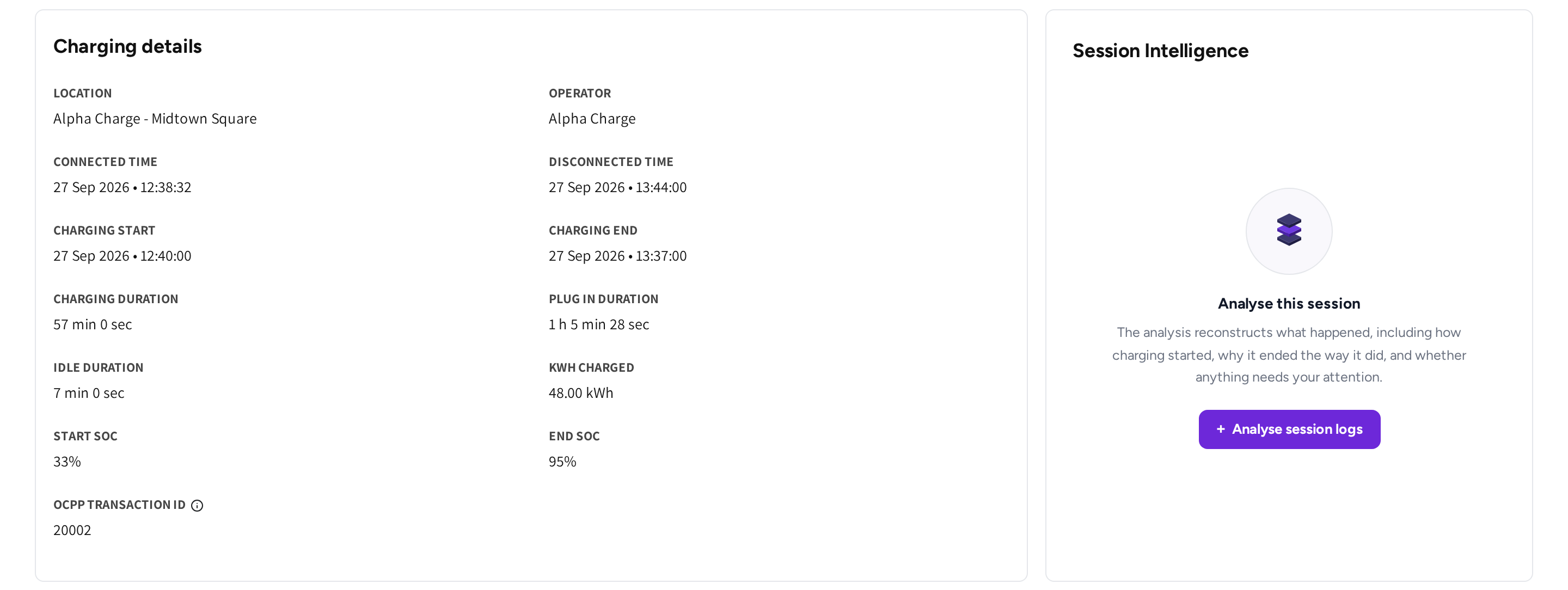
- Charging details: when the car was connected and charging, the three durations, the energy and the state of charge.
- Session Intelligence: an analysis of what happened during the session, on request.
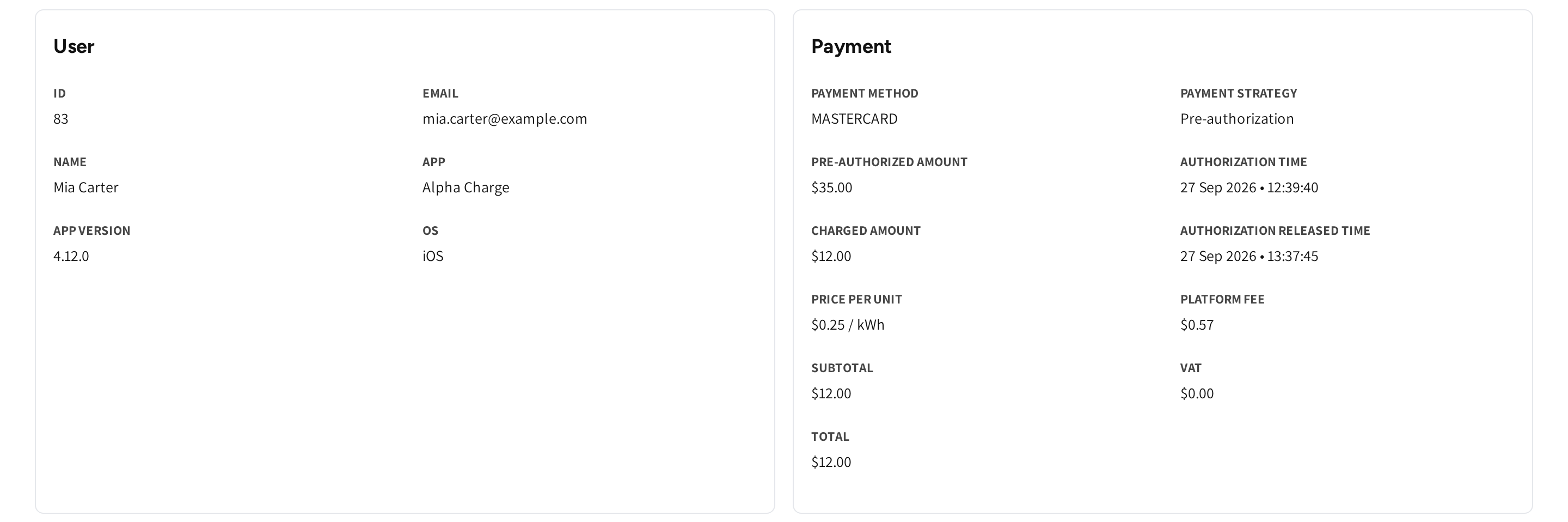
- User: who charged, and the app they used.
- Payment: how the session was paid, line by line.
Open a session
- Go to Sessions.
- Find the session with the search box or the filters.
- Open the menu at the end of the row and click View session details.
The page opens on Overview. Session Insights shows the power and energy of the charge over time.
Read the charging times
Charging details tells the story of the charge.
- Connected time and Disconnected time: when the cable went in and came out.
- Charging start and Charging end: when energy started and stopped flowing.
- Charging duration: the time energy was flowing.
- Plug in duration: the whole time the cable was connected.
- Idle duration: the time the car stayed plugged in after charging ended, which is what idle fees are based on.
- Start SOC and End SOC: the battery level the car reported at the start and the end.
- Location and Operator: where the session ran and whose network it is.
- OCPP transaction ID: the number of this session in the charger's own log, so support can match the two.
If the session was booked, then the card also shows Booked time slots.
Check a payment
Payment shows what the driver paid and how the total was built up.
| Field | What it means for you |
|---|---|
| Payment method | The card or charge key that paid. |
| Payment strategy | How the card was charged. If the strategy is Pre-authorization, then an amount is held first and only the real cost is taken. |
| Pre-authorized amount and Authorization time | The amount held on the card when the session started, and when. |
| Charged amount | What was actually taken from the card. |
| Authorization released time | When the rest of the hold was given back to the driver. |
| Refunded amount | If there was a refund, then this is the money returned to the driver after the session. |
| Pre-paid amount | If the session was pre-paid, then this is what was taken at the start, and the surplus goes back when the session is settled. |
| Price per unit | The price the session was charged at. |
| Discount | If a fleet or member discount applied, then this is the amount taken off. |
| Platform fee | The platform's share of the session cost. It is part of the total, not added to it. |
| Booking fee, Idle fee - Walk in and Idle fee - Booking | If these fees applied, then they are charged on top of the energy. |
| Processing fee | If your account passes the card payment's own transaction cost on to the driver, then this is that cost. |
| Minimum payment | If the session cost less than your minimum per session, then the minimum was billed. |
| Subtotal, the tax line and Total | The total without tax, the tax, and what the driver paid. |
If a field did not apply to the session, then it is left out. The tax line is named the way your platform names tax, for example VAT.
See the fleet behind a session
If a session was charged with a fleet charge key or a member discount, then it has one more card, Fleet.
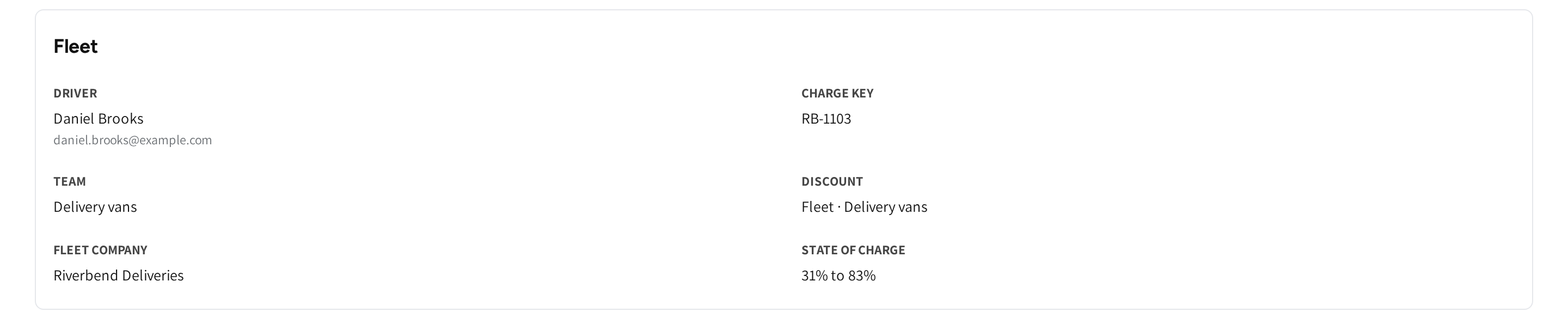
It shows the Driver, the Charge key used, the Team, the Discount and the Fleet company. If the Car, Odometer and State of charge were reported, then they appear too. The fleet list itself is on Fleet sessions.
Check the charger
Charger names the hardware: Serial number, Charger type, Plug ID and Plug type. It also shows the Charger brand and model, the Alias and the Firmware it was running. Use it when the same charger keeps turning up in driver questions.
Find out what went wrong
Click Analyse session logs on the Session Intelligence card. The analysis reads the charger's log for the session. It explains how the charge started, why it ended and whether you need to act.
It has its own guide: Session Intelligence.
Common questions
A driver disputes a charge. Where do I look? Look at Payment. It shows what was held on the card, what was charged and any refund. It also lists every fee in the total, the Platform fee included.
Why are there three durations? Charging duration is the time energy flowed, and Plug in duration is the whole time the cable was in. Idle duration is the time after charging ended, which idle fees are based on.
Why was more held on the card than the session cost? If the payment strategy is Pre-authorization, then an amount is held when the session starts. Only the real cost is charged, and the rest is released when the session ends.
Why does this session have no Fleet card? If a session was charged with a fleet charge key or a member discount, then it has a Fleet card. If the driver paid with their own card, then there is no fleet card.
Where do I see which app version the driver used? In the User card: App version sits next to App, and OS names the phone's operating system.
Updated 24 days ago