
Charge points
Manage your charging sites and every charger on them: the tabs of Charge points, the charger types, charger statuses, the plug strip and the actions every charger has.
Charge points is where you manage your charging sites and every charger on them. Use it to check a charger, act on it remotely and keep your sites in order.
At a glance
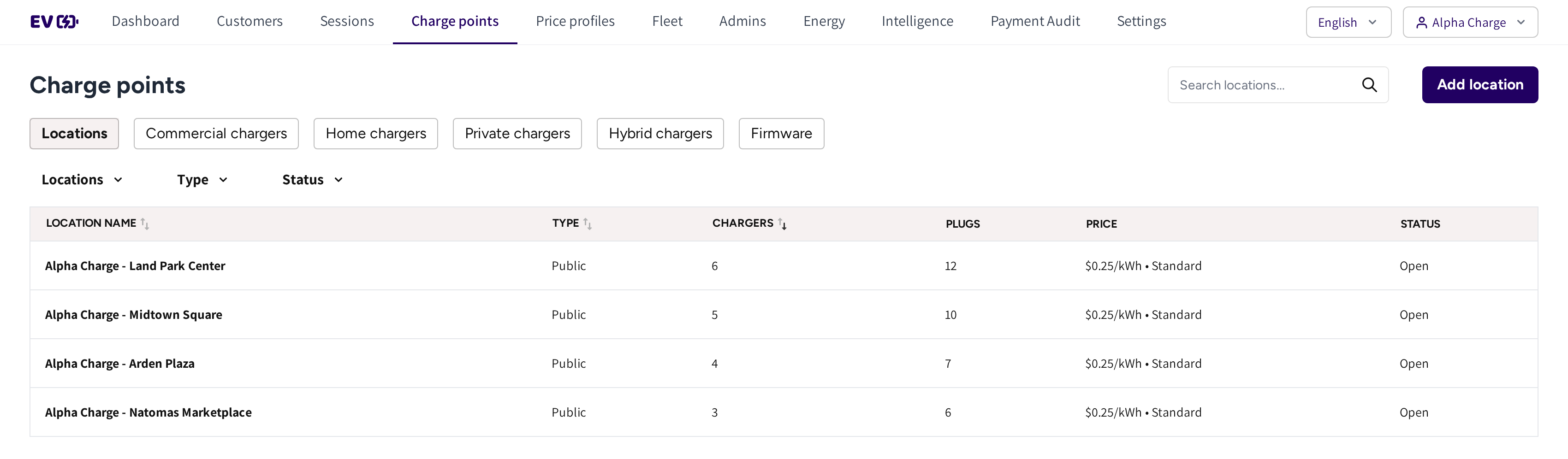
- Locations, Commercial chargers, Home chargers, Private chargers, Hybrid chargers and Firmware: the tabs of the section.
- The search box and Add location: find a site, or create a new one.
- Locations, Type and Status: the filters of the list.
- The list: each site with its Type, the number of Chargers and Plugs, its Price and its Status.
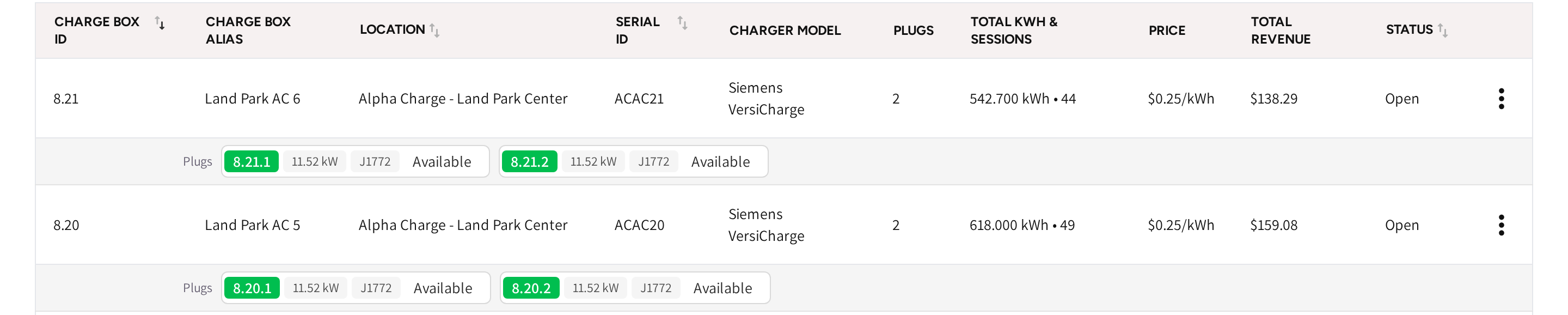
- The charger: Charge box id, Charge box alias, Location, Serial id and Charger model.
- Total kwh & sessions, Price, Total revenue and Status: what the charger delivered and earned, and whether it can charge.
- Plugs: one chip per plug with its plug ID, power, connector type and what the plug is doing right now.
- The menu at the end of the row: the actions for that charger.
The tabs
| Tab | What you find there |
|---|---|
| Locations | Your charging sites, each with its own page, see Locations. |
| Commercial chargers | Every public charger across your sites, see Commercial chargers. |
| Home chargers | Chargers at your customers' homes, see Home chargers. |
| Private chargers | Chargers owned plug by plug in shared buildings, see Private chargers. |
| Firmware | The firmware of your chargers by model, see Firmware management. |
If hybrid chargers are part of your account, then a Hybrid chargers tab is shown as well, see Hybrid chargers.
The charger types
Every charger has one type, picked when you add it. The type decides who charges on it, who pays and whether it shows in the app.
| Type | Built for | Who charges | Who pays | Shown in the public app |
|---|---|---|---|---|
| Commercial | Public charging at your sites | Everyone | Drivers, at your price | Yes |
| Home | A customer's home | The owner and the people they share it with | Settled with the household | No |
| Private | Personal use in condominiums and shared buildings | The owner of each plug and the people they share with | The plug's owner, if Paid charging is on for that plug | No |
| Hybrid | A home charger that can also serve the public | The owner, and everyone while Public sharing is on | The owner charges free, public drivers pay | Only while Public sharing is on |
One form for every charger
You add and edit every charger in one form. The tiles at the top pick the type, and the text under them says what the type is for.
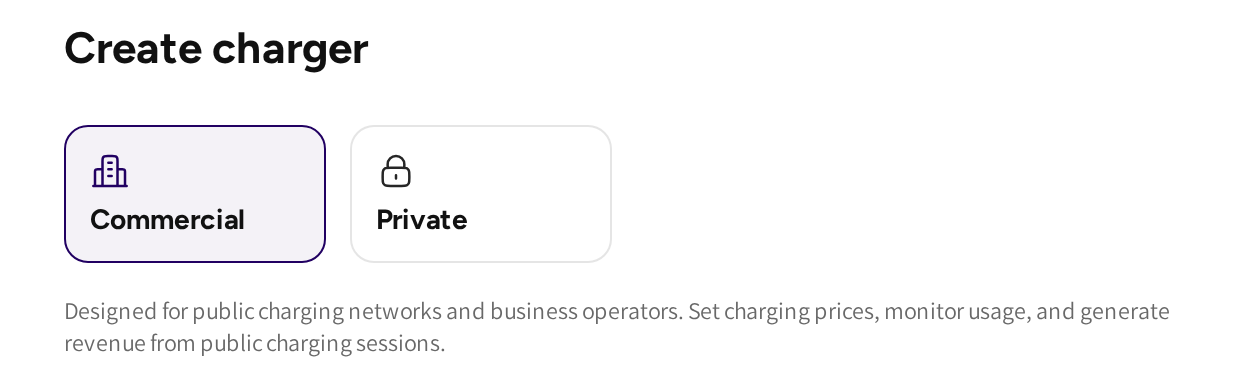
- If you add a charger from a location, then the form offers Commercial and Private.
- If you add a charger from the Home chargers tab, then the form sets up a home charger.
- If the type is Private, then the form has Configuration and owner settings, with an owner, Paid charging and Skip idle fee per plug.
- If the type is Hybrid, then the form has Public sharing.
The steps to add and connect a charger are in Adding a charger.
Read a charger row
Under each charger, the plug strip shows each plug's Plug ID, power, connector type and state. If a plug is charging, then its chip links to that session.
The Status column shows whether the charger can serve drivers right now.
| Status | What it means for you |
|---|---|
| Open | The charger is online and available for charging. |
| Offline | The charger lost its connection. Drivers cannot start a session and remote actions wait until it is back. |
| Closed | You took the charger out of use on purpose. |
| Out of order | The charger reported a fault. |
| Registering | The charger was added but has not connected for the first time yet. |
If a charger stays Offline or Out of order, then it also shows up in Intelligence, where you find what to do about it.
Act on a charger
Open the menu at the end of a charger's row.
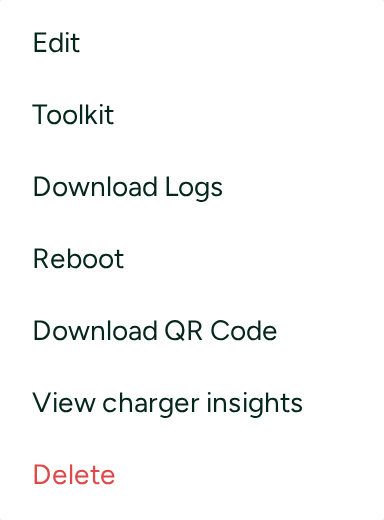
- Edit: change the charger's alias, model, location, price profile or power configuration.
- Toolkit: send commands, such as unlocking a stuck cable or taking one plug out of service, see OCPP toolkit.
- Download Logs: download the charger's own log for a date range, for diagnostics.
- Reboot: restart the charger remotely, the quickest first step when it misbehaves.
- Download QR Code: the QR codes of the plugs, ready to print, so drivers can start a charge by scanning.
- View charger insights: open the charger's own page, see Charger insights below.
- Delete: remove the charger from your account for good.
On home, private and hybrid chargers the menu also has Manage shared users, see Sharing a charger.
Charger insights
If your account has charger analysis, then View charger insights opens the charger's page in Intelligence. There you see its sessions, faults, issues and electrical readings in one place, see Charger analysis.
If your account does not have charger analysis, then View charger insights opens a charger dashboard. It shows the sessions, session length, kWh and revenue of the charger, and live graphs of its readings per plug.
Firmware
The Firmware tab keeps the firmware files of your charger models and runs updates to your chargers. The full workflow is in Firmware management.
Common questions
How do I restart a charger remotely? Open the menu at the end of the charger's row and click Reboot. The OCPP toolkit also offers a soft and a hard reset.
A driver's cable is stuck in the charger. What do I do? Open the charger's Toolkit and unlock the plug the cable is in. The steps are in the OCPP toolkit guide.
Why is my charger Offline? The charger lost its connection to the platform, often through the site's internet or power. It cannot receive remote actions, a reboot included, until it is back online.
How do I get QR codes for my plugs? Open the menu at the end of the charger's row and click Download QR Code. Print the codes and mount each one at its plug.
Can I change a charger's type later? No. The type is fixed when you add the charger. If it was picked wrong, then contact support before the charger goes into use.
Updated 11 days ago