
Charging funnel
Every charging attempt at your network, not just the sessions that ran: how many made it to a finished charge, where the rest were lost, and which charger, key or payment problem cost you the most attempts.
The Charging funnel counts every charging attempt at your network, including the ones that never became a session, and shows you where they were lost. A driver who tapped a card the charger refused, an app start the charger never answered: neither produces a session, and both are a driver who did not charge.
AvailabilityThe Charging funnel appears under Intelligence for operators where it has been enabled by EOSVOLT.
Getting there
Intelligence → Charging funnel. The page carries its own period picker, because it answers a different question from Charger health and is usually read over a different window. Last 7 days, Day view, Week view and Month view are all offered, with arrows to step back to earlier periods.
Three filters sit above the page: Location, Charger, and a CPO filter for accounts that oversee more than one operator.
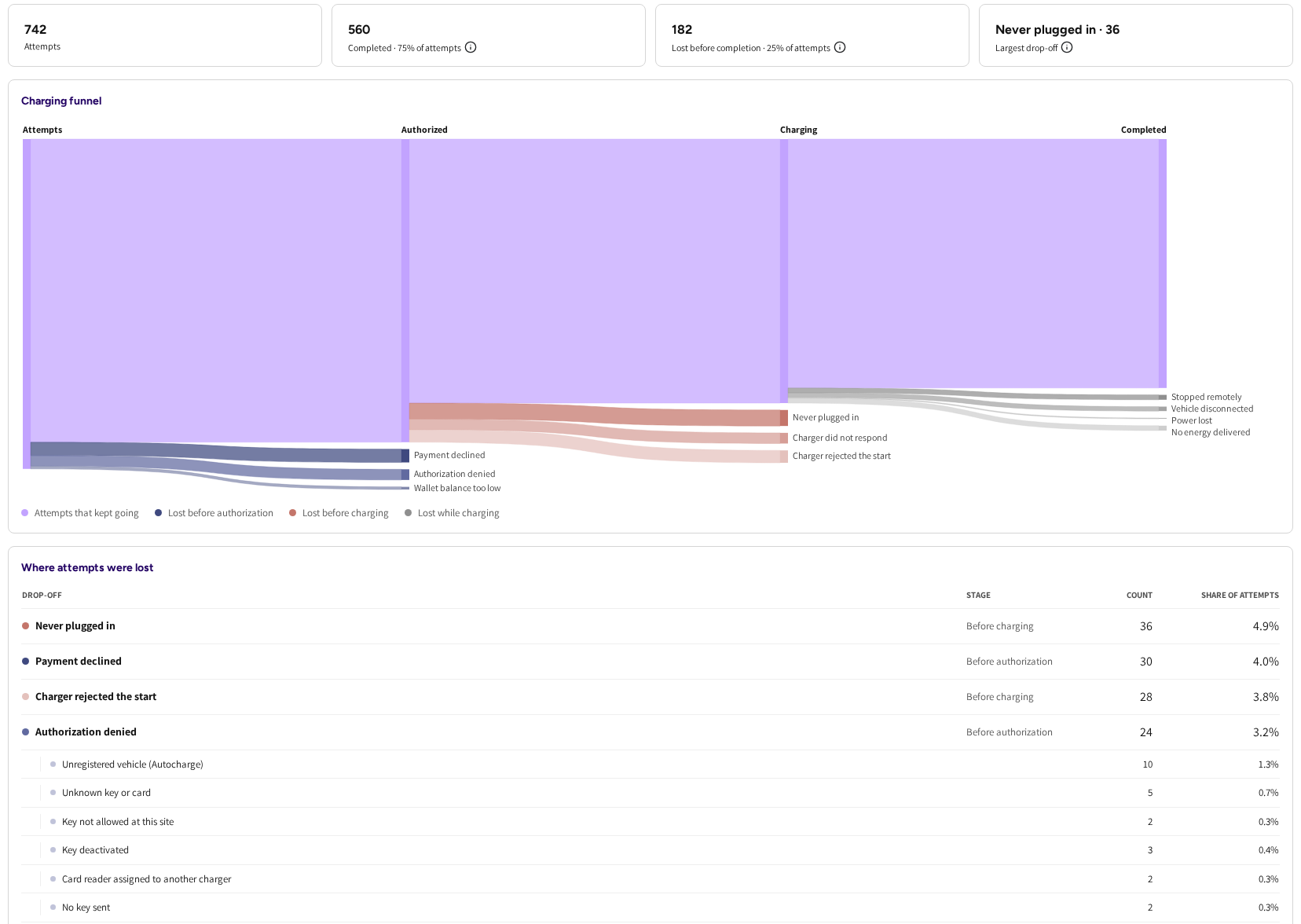
The four numbers
- Attempts: every charging attempt in the period, however it started.
- Completed: the attempts that became a charging session and delivered energy, with their share of attempts.
- Lost before completion: the attempts that stopped somewhere between the first tap and a finished charge, with their share.
- Largest drop-off: the single reason that cost you the most attempts in this period. This is the one to act on first.
The flow chart
Underneath, the funnel is drawn as a flow from Attempts to Completed, with three places where attempts leave it:
- Before authorization: the attempt never got past identity or payment.
- Before charging: the attempt was authorised but charging never started.
- While charging: charging started but nothing usable came out of it.
The band that keeps going at each stage is Attempts that kept going.
Where attempts were lost
The table below the chart is the working end of the page. Columns are Drop-off, Stage, Count and Share of attempts, and the rows say in plain words what went wrong.
Lost before authorization, meaning the attempt never got past identity or payment:
- Payment declined: the card or payment method was refused.
- Authorization denied: the identity the driver presented was not accepted.
- No usable payment method: the driver had nothing the charger could charge to.
- Wallet balance too low: the wallet did not cover the charge.
Lost before charging, meaning the attempt was accepted but charging never started:
- Never plugged in: no cable was ever connected.
- Charger did not respond: the charger never answered the start.
- Charger rejected the start: the charger answered and refused.
Lost while charging, meaning the session ran and produced nothing usable:
- Stopped remotely: the session was stopped before any energy was delivered.
- Vehicle disconnected: the car came off the cable before charging produced anything.
- Power lost: the charger lost power part way through.
- No energy delivered: the session ran and the meter never moved.
Authorization denied, broken down
Authorization denied covers several quite different problems, and they go to different people to fix, so the row opens into its own sub-rows:
- Unregistered vehicle (Autocharge): the car sent its Autocharge identifier and no registered vehicle carries it.
- Unknown key or card: the key is not in the platform at all.
- Key not allowed at this site: a known key without access to that location.
- Key deactivated: a known key that has been switched off.
- Card reader assigned to another charger: the reader is bound to a different unit.
- No key sent: the charger asked to start without presenting any identity.
The order is fixed, so a row keeps its place from one period to the next.
Drilling into a drop-off
Clicking any row opens a panel with two tabs:
- By charger: which chargers that drop-off happened on, and each one's share of it. This is how a single bad reader or a single dead unit shows itself.
- Attempts: the individual attempts, with Time, Charger, Connector, Driver, Key, Reason and Stop reason. Search by key or charger to narrow it, and open a session straight from the row where there is one.
TipOn an "Unknown key or card" row, the Key column shows the key exactly as the charger sent it, so you can match it against your charging keys or hand it to the driver's fleet manager.
What counts as one attempt
Repeated swipes of the same card at the same charger within half an hour count as one attempt. A driver who taps four times because nothing happens is one person who could not charge, not four.
Charge success and the funnel do not match
They are not measuring the same thing:
- Charge success, on the Charger health overview, counts only sessions that actually ran on a charger.
- The Charging funnel also counts the attempts that never got that far.
So a network whose chargers behave perfectly once a session starts can still have a poor funnel, and that gap is exactly what the funnel exists to show you. The page carries the same note underneath the table.
When the page has no numbers yet
Two messages are worth recognising:
- "The funnel is still collecting data": capture has only just been switched on for your account and there is nothing to report yet.
- "Capture has been live since ...": a banner on a period that starts before capture did. Attempts before that date are not counted, so the period is only partly covered and the totals will read low.
Common questions
Why do the funnel numbers not match my session count? Because the funnel does not count sessions. Attempts is higher than your session list, since it also counts the tries that never became a session, such as a refused card or a start the charger never answered. Completed is lower, since it only counts attempts that ended in a session that actually delivered energy, while the session list also holds sessions that ended with 0 kWh.
Which drop-off should I work on first? The one in Largest drop-off. Then open it, switch to By charger, and see whether it is spread across the network or concentrated on a few units. Concentrated usually means hardware; spread usually means pricing, payment or key setup.
A lot of attempts say Authorization denied. What now? Open the row and read the sub-reasons. Unknown key or card and Unregistered vehicle point at keys and cars that were never registered; Key not allowed at this site points at your location access; Card reader assigned to another charger points at an installation that needs correcting.
Why does one driver's four taps show as one attempt? Repeated swipes of the same card within half an hour are counted once, so a driver retrying does not inflate your numbers.
Can I see the funnel for one site only? Yes. Use the Location filter above the page, and the Charger filter to narrow it further.
Updated 25 days ago