
Hybrid chargers
A home charger that can also serve public drivers: the owner charges free, and with Public sharing on other drivers can find it and pay to charge.
A hybrid charger is a home charger that can also serve other drivers. Its owner charges free, and while Public sharing is on, other drivers can find it and pay to charge.
At a glance
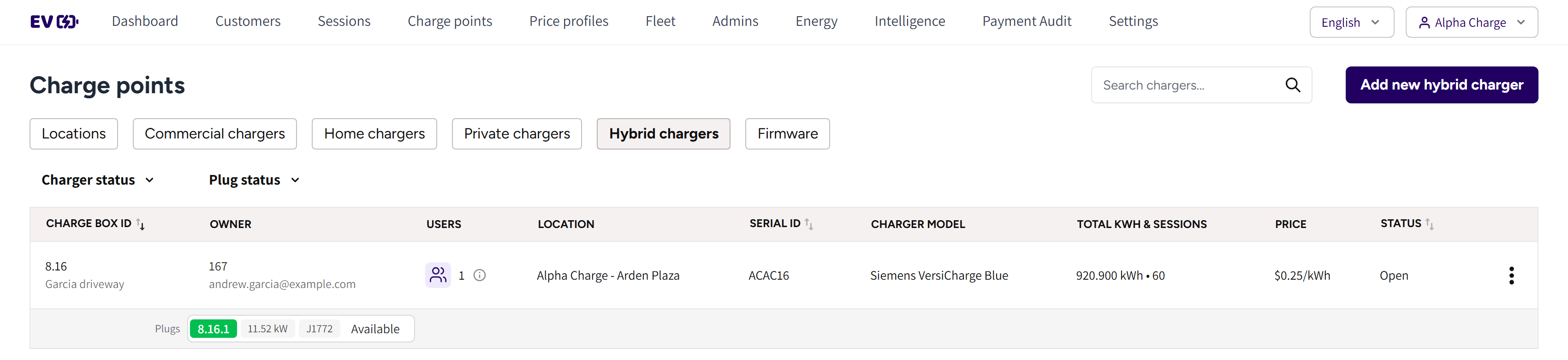
- Hybrid chargers: the tab with every hybrid charger of your account.
- The search box and Add new hybrid charger: find a charger, or add one.
- Charger status and Plug status: the filters of the list.
- Charge box id and Owner: the charger with its alias, and its owner.
- Users: how many people the owner shares it with.
- Location, Price and Total kwh & sessions: where public drivers find it, what they pay and what it delivered.

- Public sharing: on, the charger serves public drivers and shows on the map.
Who charges and who pays
| Who | While Public sharing is off | While Public sharing is on |
|---|---|---|
| The owner | Charges free | Charges free |
| Shared users | Charge free | Pay like public drivers |
| Other drivers | Cannot charge | Pay the charger's price |
While Public sharing is off, the charger works like a home charger and does not show in the public app.
Add a hybrid charger
- Go to Charge points → Hybrid chargers and click Add new hybrid charger.
- Pick the Location where public drivers will find the charger.
- Pick the Brand and the Model, and enter a Charge box alias.
- Enter the Serial id and pick the State.
- Leave Public sharing on, or switch it off to start as a home charger only.
- Under Owner settings, invite the owner by email or offline.
- Click Save.
Only public locations can be picked. The owner claims the charger in the app with the redemption code, and from then on charges free.
Switch public sharing on or off
- Open the charger's menu and click Edit.
- Switch Public sharing on or off.
- Click Save.
Every plug of the charger must be available to change this, so wait until nobody is charging. When you switch it off, the charger disappears from the public app.
Pricing
Public drivers pay the price profile of the charger's location, shown under Price in the list. See Price profiles.
Sharing and several plugs
The owner can share the charger with up to five people. You manage that list with Manage shared users in the charger's menu. See Sharing a charger.
A hybrid charger with two plugs has one owner. The owner sees it once per plug in the app, and Manage shared users shows a section per plug.
Common questions
Does the owner pay when public drivers use the charger? No. The owner always charges free. Public drivers pay the charger's price.
Can the owner turn public access off? Yes. With Public sharing off, the charger works like a home charger and does not show in the public app.
Why can I not switch Public sharing? Every plug must be available, so wait until the current session has ended.
Can I turn a home charger into a hybrid charger? No. A charger's type is fixed when you add it. Add the charger again as a hybrid charger.
Why do I not see the Hybrid chargers tab? Hybrid chargers are not part of your account yet. Contact support to add them.
Updated 23 days ago